Showing posts with label earth as art. Show all posts

Sunday, 31 October 2010

Work for 8D

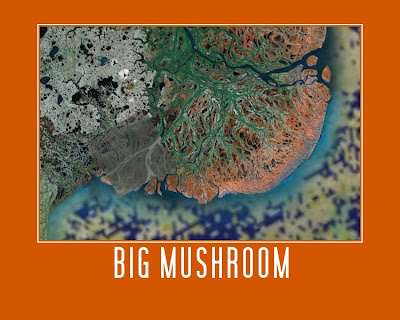
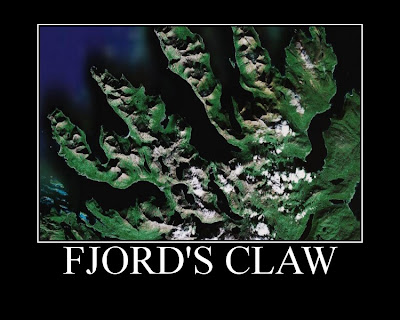
Good morning 8D! I'm sorry that I am not there for your first lesson back... However... Your challenge for today is to use Google Earth to produce a fantastic piece of art work... Below are two of my favourite examples from Year 8 groups over the past couple of years, and you can see some of the others by clicking here.


To make your own...
1. Open Google Earth (Start, Swanwick Hall, Humanities, Google Earth).
2. Spend some time exploring, and find yourself a beautiful view.
3. Open a new Ppt presentation.
4. Back in Google Earth, make sure you are happy with your view - do you want to zoom in or out, or tilt it? You'll probably also want to turn several layers (Gallery, Panoramio, Borders and Labels, etc. off - do this towards the bottom of the sidebar on the left - this will remove "clutter" from your view), then take a screenshot (hold down Ctrl + press PrtScn).
5. Paste your screenshot into your Ppt slide.
6. Crop your screenshot until you are happy with it.
7. Right-click on your picture, and select "Save as picture..." Give your picture a sensible name, and save it in your user area (preferably in a Geography folder!). Check that the filetype (in the dropdown box below where you type the filename) is .png or .jpg.
8. Go to the Big Huge Labs website. Upload your picture, and then experiment with colours, etc. and give your work a caption.
9. When you are completely happy with it, click Create. Once your finished poster appears, you can either go back and edit it, or click Save. Save the file to your computer, giving it a filename that includes your name.
10. Open your school emails. Type vel into the address bar, and then attach your finished work (not the screenshot from your ppt). Send!

I am expecting AT LEAST one brilliant piece of work from each of you, and we'll have a look at everyone's work when I see you on Tuesday.

Good luck and have fun! Miss Ellis :)

Wednesday, 21 October 2009

8BL - Earth as Art challenge...

Good morning 8BL! Your challenge for today is to use Google Earth to produce a fantastic piece of art work... Below are two of my favourite examples from last year's Year 8 groups, and you can see some of the others by clicking here.


To make your own...
1. Open Google Earth (Start, Swanwick Hall, Humanities, Google Earth).
2. Spend some time exploring, and find yourself a beautiful view.
3. Open a new Ppt presentation.
4. Back in Google Earth, make sure you are happy with your view (do you want to zoom in or out, or tilt it?), then take a screenshot (hold down Ctrl + press PrtScn).
5. Paste your screenshot into your Ppt slide.
6. Crop your screenshot until you are happy with it.
7. Right-click on your picture, and select "Save as picture..." Give your picture a sensible name, and save it in your user area (preferably in a Geography folder!). Check that the filetype (in the dropdown box below where you type the filename) is .png or .jpg.
8. Go to the Big Huge Labs website. Upload your picture, and then experiment with colours, etc. and give your work a caption.
9. When you are completely happy with it, click Create. Once your finished poster appears, you can either go back and edit it, or click Save. Save the file to your computer, giving it a filename that includes your name.
10. Open your school emails. Type vel into the address bar, and then attach your finished work (not the screenshot from your ppt). Send!

I am expecting two brilliant pieces of work from each pair, and we will have a look at everyone's work on Friday morning. Have fun!

Friday, 17 October 2008

More Earth as Art!

8CDr's turn this time, and some fantastic work which you can have a look at on Geogtastic's Flickr page. This one was my favourite today... Well done Liam!

If you want to make your own:
- find yourself a beautiful view in Google Earth
- save it as a png or jpeg file
- go here

Have fun!

Friday, 10 October 2008

Earth as Art...

8KJe spent their lesson this morning using Google Earth to create some superb art work... My personal favourite is Kieran's "Fjord Claws" below, but you can check out some of the others on Geogtastic's new Flickr pages.


If you want to create your own, have a look at Big Huge Labs Motivator tool.